



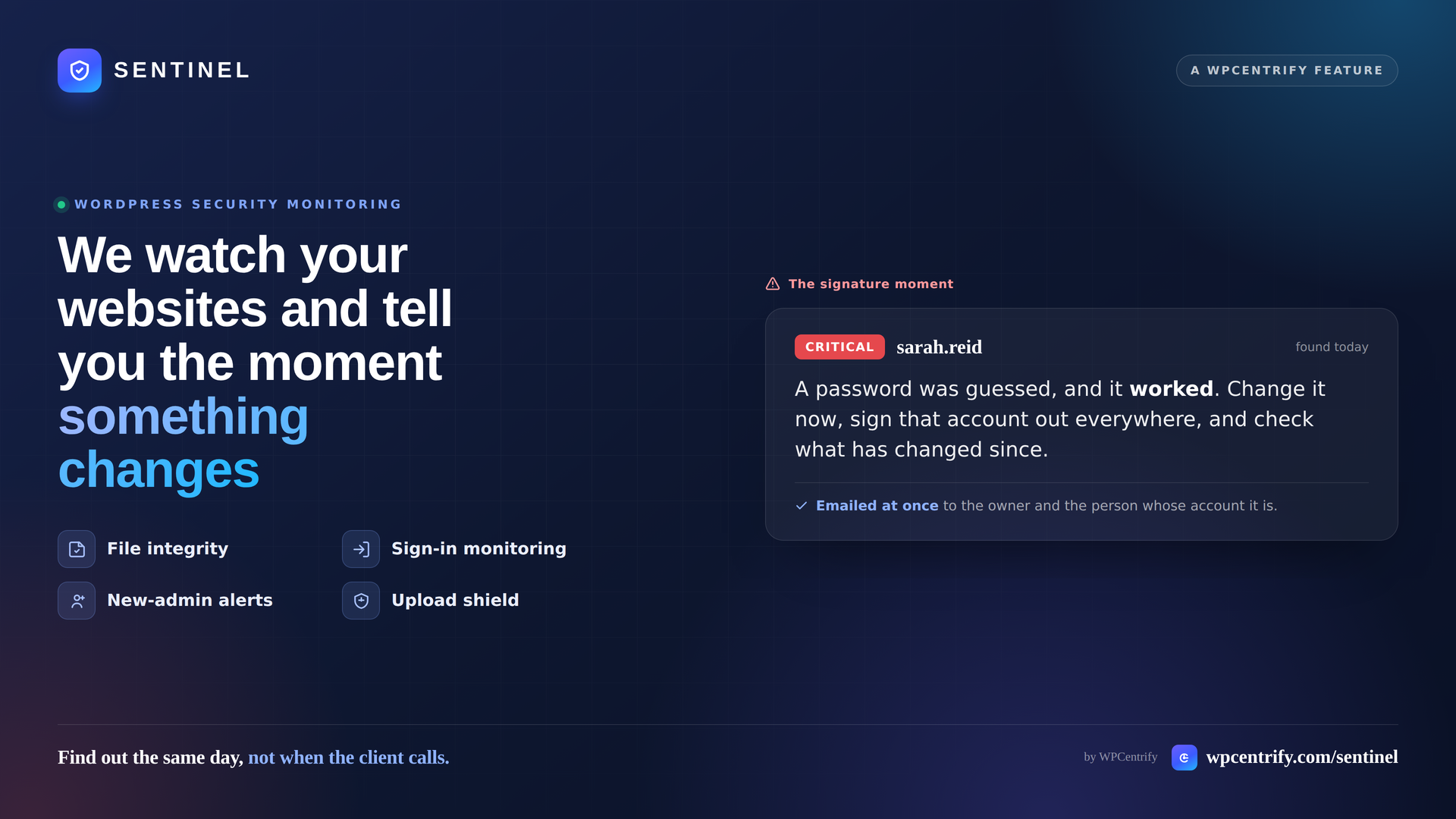
There is a version of the “your site is down” message that is much worse than downtime. It is a client forwarding you an email from their host, or a customer, or Google Search Console, saying their WordPress site is doing something nobody asked it to do.
By then the question is no longer what broke. It is how long has this been running, and what else did they touch. Both are much harder to answer after the fact.
WordPress security monitoring exists to close that gap. It is the difference between finding out the same day and finding out when the client calls.
This guide covers what security monitoring actually watches, why most of it gets ignored, and how WPCentrify’s Sentinel handles it across a portfolio of sites.
What WordPress security monitoring actually does
At its simplest, security monitoring watches a site for change and tells you when something is different from yesterday.
The useful version narrows that down to four questions:
- Did any files change? Core and plugin files that were modified, removed or added since they were installed.
- Did anything new get installed? Plugins, components and folders that nobody on your team put there.
- Who signed in, and from where? Successful sign-ins, failed attempts, and unfamiliar locations.
- Did anyone gain admin rights? New administrator accounts, and existing accounts that were quietly promoted.
Most tools answer question one. Everything after that is where compromises actually begin, and where they survive a clean-up.
Why most WordPress security alerts get ignored
Every WordPress site on the internet is attacked constantly. That is not an opinion or a scare tactic, it is just the baseline condition of running a public login form.
Which creates the real problem: a raw feed of security events is worse than no feed at all. It buries the one thing that matters under thousands of things that do not. After a few weeks of “47 blocked login attempts today” emails, nobody opens them, including the week one of those attempts works.
The failure modes look like this:
- A report per site. Forty sites, forty emails, zero read.
- A green tick that means “we did not look.” A check that failed to run should never look identical to a check that came back clean.
- The same problem, forty times. A plugin pulled from the WordPress directory across nine client sites is one decision, not nine tickets.
- Detection with no timing. Finding out about a compromise is only useful if you find out early.
Good monitoring is mostly an editing problem. The watching is the easy part.
What strong security monitoring should cover
If you are evaluating a tool for a portfolio, these are the areas worth insisting on.
File integrity. Your WordPress core and plugin files should be compared against what the official release and the plugin author actually publish, and any difference reported.
Runnable code where it does not belong. Executable files in the media library are a well-known hiding place, and nothing executable belongs there.
Plugin and component arrivals. Anything installed that was not there before should be raised for confirmation, including the hidden locations that load on every request.
Sign-in history with location. Not just a count of attempts. Which account, which site, from where, and when.
Administrator changes. A brand-new account that already holds administrator is the most common way a compromise survives a clean-up.
Certificates and configuration. Expiring SSL, unsupported PHP or WordPress versions, missing security headers, open registration into a powerful role. Predictable problems with predictable fixes.
Restraint in alerting. Urgent emails should be rare enough that people still open them.
How WPCentrify’s Sentinel approaches it
WPCentrify is a WordPress management platform built for people responsible for more than one site. Sentinel is its security monitoring layer, and it watches each site from the inside using a free connector plugin, so it reports what is actually installed and what the files actually contain rather than what an external scanner can guess from outside.
Here is the overview of what it covers.
File and code integrity
Sentinel watches core and plugin files and reports anything modified, missing or added since installation. It also finds runnable code sitting in places nothing executable belongs, such as the media library. Changed WordPress core files can be repaired in one click from the dashboard on the higher plans.
Watching what gets installed
Anything that appears on a site and was not there before gets raised for confirmation, including components hidden in the places malicious code likes to load from, and folders in your plugins directory that WordPress does not recognise as plugins at all.
Each arrival is answered once: expected, unauthorised, or malicious. You can deactivate or remove a component straight from the dashboard, and because that still works on a site throwing a fatal error on every page, it doubles as a recovery tool. Withdrawn and abandoned plugins are flagged too.
Sign-in monitoring
Sentinel keeps a full record of who signs into every managed site, from where and when, filterable by client, account and time. It learns where each account normally signs in from and flags sign-ins from somewhere unusual. On the failed side, it shows the shape of what is happening — a script working through common usernames, somebody targeting one real account, or a distributed attack from more addresses than can be tracked individually.
Administrator monitoring
New administrator accounts are raised as critical and emailed immediately. Long-standing accounts that have only now been promoted are treated as a different story and worded accordingly. Administrators that appeared and then removed themselves stay on the record, and dormant admin accounts nobody has used in a long time get flagged.
Active protection: the upload shield
Everything above watches. This part refuses. The upload shield is a per-site switch that blocks executable files and archives from landing in the media library and other sensitive folders, and it catches filenames disguised to look harmless. Installing plugins and themes through WordPress still works normally.
Usefully, the dashboard only shows a site as protected when the site itself confirms the protection is working. Some hosts ignore the rules file, and Sentinel says “half protected” rather than claiming cover you do not have.
Certificates, domains and configuration
Expiring, expired or misconfigured SSL certificates, domain registrations running out, unsupported PHP and WordPress versions, missing security headers, code editing enabled in the admin area, reachable XML-RPC, directory listing, and open registration into a powerful role.
The two design decisions that make it usable
Coverage is table stakes. What determines whether a security tool actually gets used is how it presents what it finds, and Sentinel does two things differently.
One row per problem, not one per site. A withdrawn plugin across nine client sites is a single row that expands to nine when you want the detail. You make one decision instead of working through nine identical tickets.
Two queues, not one feed. Findings are things that need an answer, a to-do list where every row ends when somebody does something. Warnings are standing conditions nobody can switch off, like an ongoing attack on a login form: worth knowing, never a task. Keeping that noise out of the to-do list is what keeps the to-do list short enough to finish.
Anything can also be accepted as a known risk with a written note. It stops shouting but stays on the record, logged with who accepted it and when, and the note explains the decision to whoever reads it in six months.
The alert that matters most
Every login form on the internet gets guessed at all day. On its own, that is noise. The signal is the moment it works.
When an address that had been failing to sign in then succeeds, Sentinel raises it as a critical finding and emails immediately. That is what a guessed password looks like, and it is the line between “somebody is trying” and “somebody is in.”
The alert reaches the workspace owner, anyone trusted with the security area, and the person whose WordPress account it actually was, matched by email address. They are the only one who can change that password in the next ten minutes.
Worth being clear on the boundary: Sentinel does not block brute-force attempts, and two-factor authentication is what makes those pointless anyway. What it does is show you who is attacking and tell you the moment one gets in.
What Sentinel is not
Any security tool worth trusting is specific about its limits, so here are Sentinel’s.
- It is not a firewall and does not sit in front of traffic.
- It is not a signature-based malware scanner. It reports files that changed and code where it should not be, rather than matching a virus database.
- It does not do backups or restore, beyond repairing WordPress core files. Backups are a separate part of the platform.
- It is not real time. Sites check in every few minutes and findings appear the same day.
- Known-vulnerability matching against a CVE database is a future addition. Withdrawn and abandoned plugins are flagged today.
Requirements and access
Sentinel needs the free WPCentrify connector plugin on each site. It has no dependencies and works on PHP 7.4 and up. When a site is running an older connector version, the dashboard says so plainly rather than showing an empty result.
Sentinel is included in the plan rather than sold separately, on the team tiers rather than the single-operator entry plan, with core file repair and the Monday weekly summary email on the higher tiers. Two policies are worth knowing: critical findings are never withheld from anybody regardless of tier, and where routine findings are delayed, nothing is missed — only reading the detail waits. Full details are on the WPCentrify pricing page.
A short WordPress security checklist
Whatever tool you use, this is the setup that avoids the common failure modes:
- Watch file integrity on core and plugins, not just core.
- Get alerted on new plugin installs, not only on plugin updates.
- Alert on new and newly promoted administrator accounts.
- Record sign-in locations, not just sign-in counts.
- Treat a successful login after repeated failures as a critical event.
- Turn on SSL and domain expiry warnings across every site.
- Enforce two-factor authentication on every administrator account.
- Group findings by problem so portfolio-wide issues are one decision.
- Keep urgent emails rare enough that people still open them.
Frequently asked questions
What is WordPress security monitoring? Continuously watching a WordPress site for change — files, plugins, users, sign-ins, certificates and settings — and reporting anything that needs a person. It is detection and alerting, not a firewall.
How is it different from a security plugin? A security plugin generally protects one site from inside that site. Monitoring across a portfolio puts every site in one list, so a problem affecting many sites is visible as one problem rather than scattered across forty dashboards.
How quickly are issues detected? With Sentinel, sites check in every few minutes and findings appear the same day. Critical items that suggest somebody may already be in trigger an immediate email.
Does it slow the site down? No meaningfully. The connector reports on a cycle; the load is negligible against normal traffic.
Does it remove malware? No. Sentinel reports changed files and code where it should not be, and can restore WordPress core files. Clean-up of anything else is still a manual job.
The takeaway
Security monitoring is not really about security. It is about who finds out first.
When you are the one telling a client that an account was accessed from another country and you have already reset the password, that is evidence you are watching. When the client tells you, it is evidence you were not.
If you manage more than one WordPress site, this is worth testing against something real. WPCentrify is currently open for early access, free during the early access period, and connecting a site takes a couple of minutes. The full breakdown is on the Sentinel feature page.
And if you would rather someone else watched your sites and dealt with what turns up, that is exactly what our WordPress management service is for. Get in touch and we will take it from here.
