


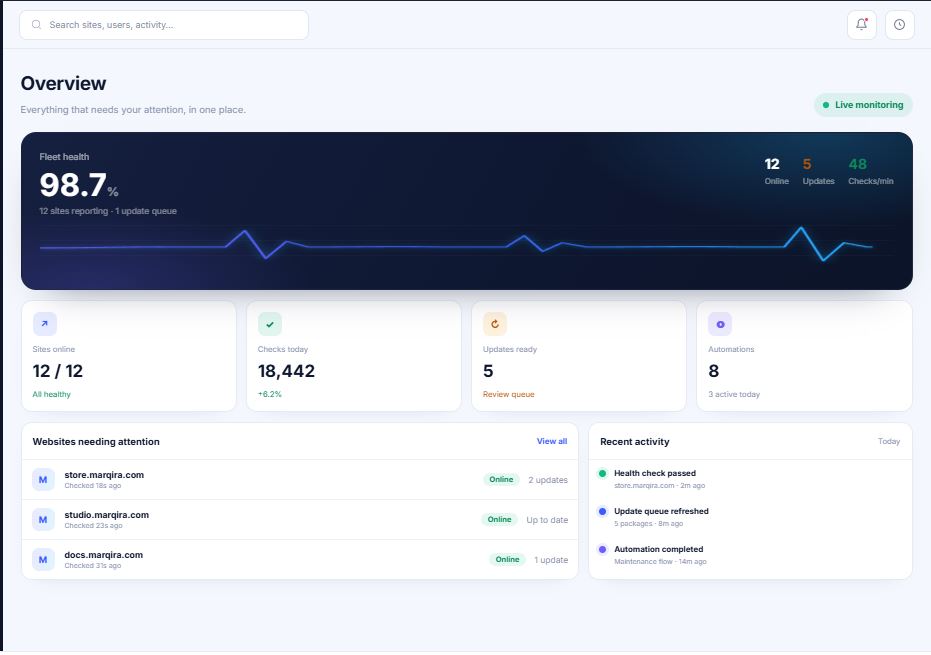
If you look after more than one WordPress site, you already know the quiet math of scaling: every new site adds another round of plugin updates, another backup to verify, another uptime alert to chase, and another status check to run by hand. A couple of sites are manageable. A dozen or more spread across a patchwork of tools and logins is how weekends disappear, whether you’re a solo freelancer, an in-house team, or a growing agency.
WPCentrify is built to fix exactly that problem. It’s a WordPress management platform: a single command center to manage multiple WordPress sites safely, keep them secure and online, and (for those who charge for it) turn maintenance into predictable recurring revenue. Here’s a closer look at what it does and who it’s for.
What Is WPCentrify?
At its core, WPCentrify lets you connect every WordPress site you look after and run the routine work (updates, backups, monitoring, security, and reporting) from one dashboard. That “one dashboard” idea isn’t new; plenty of tools promise it. What sets WPCentrify apart is the layer it builds on top: safer automation and, for those who need it, agency operations.
Instead of pushing updates and hoping nothing breaks, WPCentrify treats every change as something to be tested, verified, documented, and reversed if needed. That matters whether you’re protecting your own business site or dozens of client sites. And for freelancers and agencies who sell maintenance, it connects that work to the things they get paid for: WordPress care plans, client reporting, and account profitability.
If you want the plain-English definitions behind any of the terms in this post, WPCentrify keeps a helpful glossary and a set of guides worth bookmarking.
Why You Need a WordPress Management Platform
WordPress powers a huge share of the web, and its open plugin ecosystem is both its greatest strength and its biggest maintenance headache. A single outdated plugin can open the door to a known vulnerability, and the WPScan vulnerability database adds new disclosures constantly. Keeping WordPress core, plugins, and themes current is non-negotiable, but doing it blindly is how a routine Tuesday update takes down a live checkout page.
That’s the real tension, whether you manage one site or a hundred:
- Skip updates, and you invite security risk and technical debt.
- Apply them carelessly, and you risk breaking sites you’re responsible for.
- Do everything manually and cautiously, and it eats time you don’t have.
A dedicated management platform breaks that trade-off by making safe, automated maintenance repeatable across every site at once.
Key Features of WPCentrify
Here’s how the platform maps to the daily work of managing WordPress, from a single business site to a full portfolio.
Safe Updates You Can Trust
This is WPCentrify’s headline differentiator. Its safe updates workflow takes a restore point before updating, runs the update, then performs health and visual regression checks to catch anything that changed. If something looks wrong, it can roll back automatically, so a bad plugin release doesn’t become an emergency call from your client.
Bulk Updates Across Your Whole Portfolio
Need to patch a critical plugin everywhere at once? Bulk updates let you update core, plugins, and themes across many sites in a few clicks, with approvals and scheduling so nothing ships at the wrong time.
Backups and One-Click Restore
Reliable backups are the safety net under everything else. WPCentrify handles scheduled and on-demand backups so that when something goes wrong, recovery is fast and predictable rather than a scramble.
Uptime and Performance Monitoring
Know about downtime before your client does. Uptime monitoring tracks availability, while performance monitoring keeps an eye on page speed and Core Web Vitals, the metrics Google uses to assess real-world user experience.
Security and Vulnerability Scanning
Portfolio-wide security scanning surfaces malware and known vulnerabilities so you can prioritize the sites most at risk. WPCentrify also publishes ongoing WordPress security news to help you stay ahead of emerging threats.
White-Label Client Reports
This is where maintenance becomes visible value. Automated client reports, fully white-labeled with your branding, show clients exactly what you did each month, which makes renewals and price increases far easier conversations.
Team Access and One-Click Login
Give your team role-based access without sharing passwords, and jump straight into any connected site with secure one-click login. Rounding out the toolkit are staging, site migration, activity logs, and workflow automation.
For Freelancers and Agencies: Care Plans and Profitability
If you sell maintenance for a living, WPCentrify goes beyond the technical layer and ties the work to the business model freelancers and agencies run on: recurring WordPress care plans. (Managing your own sites? Feel free to skip ahead, but the tools below are handy if you ever start charging for it.)
If you’re still working out what to offer and what to charge, the platform’s resources are genuinely useful, including a guide on how much to charge for WordPress maintenance, a downloadable maintenance checklist, and a care plan calculator to model your pricing and margins. Together with WordPress maintenance software that automates the delivery, that’s a full loop from selling a plan to fulfilling it profitably.
How WPCentrify Compares to the Alternatives
The WordPress management space is crowded, with established names like ManageWP, MainWP, WP Umbrella, and others. WPCentrify’s pitch isn’t a longer feature checklist. It’s the combination of safer automation and, for those who need it, full agency operations in one place.
If you’re evaluating options, its comparison content is refreshingly balanced. You can browse the full list of alternatives or dig into specific ones like the ManageWP alternative, WP Umbrella alternative, and MainWP alternative, plus head-to-head breakdowns such as ManageWP vs MainWP.
Who Is WPCentrify For?
WPCentrify is designed for anyone responsible for one or more WordPress sites:
- Freelancers keeping client sites healthy and building recurring maintenance income.
- Agencies managing client portfolios, teams, and care plans.
- Business owners and site owners running one or several sites in-house.
- WooCommerce stores where uptime and safe updates directly protect revenue. The stakes only rise as WooCommerce sites process real transactions.
Because it’s hosting-neutral and API-first, it slots into your existing stack rather than forcing you to move hosts or rebuild your workflow.
Getting Started
WPCentrify treats trust as part of the product, with dedicated security documentation to answer data-handling questions up front. You can review pricing, explore the full feature set, or request early access to try it on your own sites.
Final Thoughts
The best WordPress management platform isn’t the one with the longest feature list. It’s the one that lets you run your sites with less risk and less repetitive work. By pairing verified, reversible automation with the monitoring, reporting, and (when you need them) client and profitability tools, WPCentrify makes a strong case for freelancers, site owners, business owners, and agencies alike who want to stop fighting their tooling.
Whether you manage one WordPress site or a hundred, it’s well worth a look.